Real Estate Marketing Guide for Listings That Actually Sell
100% of home buyers begin their search online, and 85% consider photos the most critical factor when evaluating a property digitally, according to industry coverage of National Association of Realtors research. The first screen often determines whether a buyer clicks, saves the listing, asks a question, or leaves. Signs, postcards, and personal branding still support the sale, but they rarely repair weak listing media.
Real estate marketing now functions as a connected listing-media system, not a lead-generation campaign. Photography, floor plans, video, virtual staging, and channel distribution must present the property clearly wherever buyers shop. Rapid follow-up then matters in the first five minutes after an inquiry. Strong visuals earn attention, while a prepared response turns that attention into a conversation and, potentially, a showing.
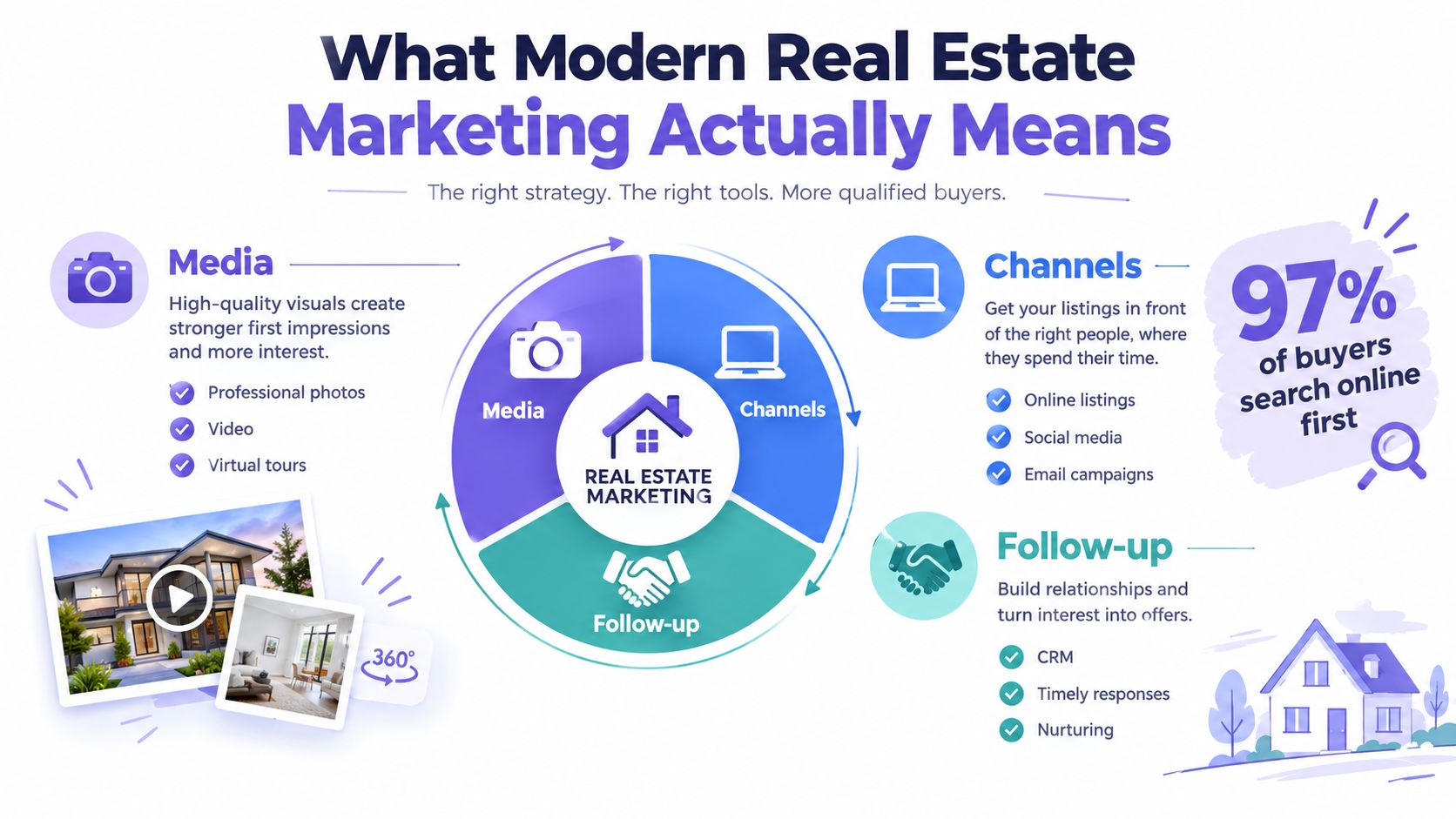
What Modern Real Estate Marketing Actually Means
Real estate marketing is the complete system that moves a property from listed to sold. It includes the media you create, the channels that distribute it, the listing presentation that earns the seller's confidence, and the follow-up process that turns online interest into a showing.
The online shift is structural. The same real estate photography research summary reports that 87% of buyers rely on online images in their decision-making. In one cited dataset, viewers spend 60% of their time looking at images and only 20% reading the description, so the first visual frame often carries more persuasive weight than several carefully written paragraphs.
That's why listing marketing differs from agent marketing. Agent marketing builds your reputation, personal brand, farming presence, referral network, and long-term lead pipeline. Listing marketing gives one property the media and conversion assets it needs right now. This guide focuses on the second system, while recognizing that your brand gives every listing added credibility.
Practical rule: Treat the listing gallery as the first sales conversation. It should answer the buyer's immediate questions before you ask for a showing.
A useful listing system has four operating pillars:
- Photography: Create a clean, accurate, well-sequenced gallery that earns the first click.
- Virtual staging: Add visual context to vacant, dated, or difficult-to-understand rooms without misrepresenting the property.
- Distribution channels: Publish the right assets across the MLS, portals, social platforms, email, video platforms, and offline materials.
- Rapid response workflows: Contact interested buyers quickly, provide useful answers, and make the next step easy.
Every later decision, from the media brief to the advertising budget, should serve two moments: the first screen a buyer sees and the first five minutes after an inquiry.
How Buyers Shop for Homes in 2026
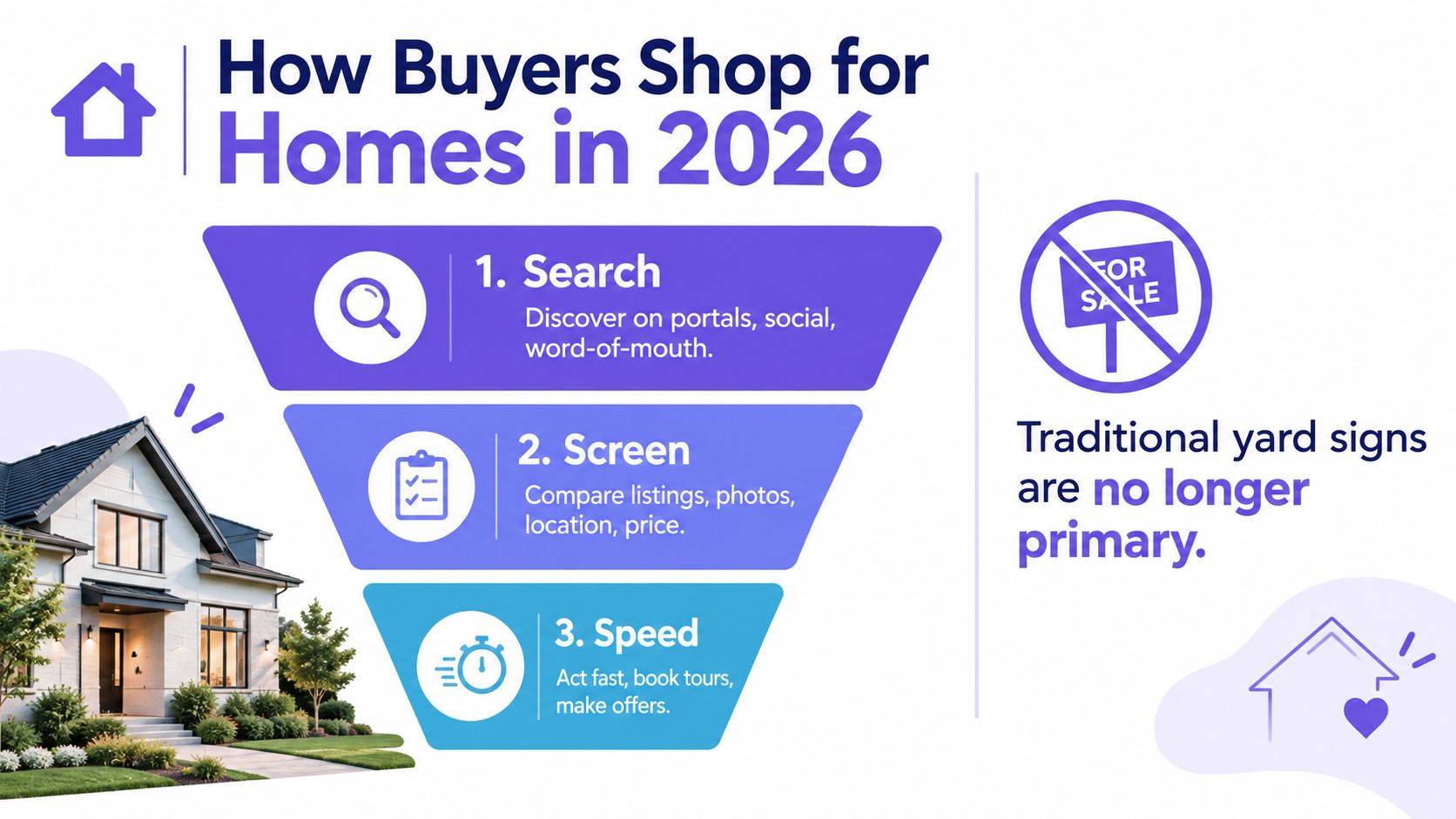
For buyers shopping in 2026, the journey is best understood as search, screen, and speed. They discover homes through the MLS, major portals, social content, referrals, and agent alerts. Then they make a rapid visual judgment, often comparing several listings before deciding which deserve deeper attention.
The screen stage is where listing media earns its keep. Buyers scan the hero image, move through the gallery, look for room relationships, check the floor plan, and assess whether the property feels consistent with the price and description. A listing with professional photographs but no floor plan may leave scale unclear. A listing with a floor plan but no video may fail to communicate movement and flow. The strongest package removes uncertainty from several angles.
The available evidence makes the visual filter clear. One industry marketing statistics summary reports that 99% of home buyers say listing photos are the most factor in deciding which homes to visit, while another cited figure says 70% skip listings with low-quality photos. The buyer doesn't need to announce that decision. They stop scrolling.
Build assets for each stage
Search needs a recognizable thumbnail, accurate address and location information, compelling copy, and distribution across the places your market uses. Social video can create discovery, but it should point back to a complete listing page rather than function as an isolated performance.
Screen needs a curated gallery, floor plan, room dimensions, video, and clear disclosure when imagery has been virtually staged. Photo count matters too. Published guidance identifies 22 to 27 photos as the optimal range, while galleries with fewer than 9 photos underperform and galleries above 35 can dilute attention, according to listing photo count guidance.
Speed begins when a buyer asks a question, requests a tour, or submits contact information. Your CRM should alert the right person, display the property context, and provide a response template that still sounds human. Don't make a buyer repeat the address or explain which feature caught their attention.
Mobile viewing also changes production choices. Use strong crops, readable floor plans, compressed files, and a gallery that loads smoothly. AI recommendations and short-form video can expand discovery, but richer formats only help when the underlying listing media is accurate and complete.
Core Channels Every Agent Should Run
A listing doesn't need every possible channel. It needs a coordinated stack in which each channel has a job, a cost you can justify, and a KPI you can review.
Digital distribution gives the property reach. Use MLS syndication, portal placements, Facebook and Instagram ads, Google Business Profile updates, YouTube tours, and TikTok or Reels clips when they fit the listing and audience. Organic visuals can supply paid creative, paid campaigns can send qualified traffic to portal pages, and portal activity can generate showing requests.
Print and offline materials still support local visibility. Yard signs, feature sheets, Just Listed postcards, and broker window displays help neighbors, open-house visitors, and nearby professionals understand that the property is active. They rarely replace the online listing, but they can reinforce it.
The listing presentation is a separate channel. A polished seller deck, comparative market analysis, media plan, and digital preview help you win the listing before the marketing campaign begins. Sellers need to see exactly what you'll produce, where it will appear, and how you'll evaluate performance.
Visual media is the conversion layer. Professional photography, drone imagery where appropriate, 3D tours, floor plans, video, and virtual staging help buyers understand the property before they commit time to a visit. Listings with professional photos have been reported to receive 118% more online views, sell 32% faster, and close at 1.2% to 3.5% higher final prices than comparable listings using lower-quality imagery, according to this industry photography analysis.
| Channel Family | Typical Cost per Listing | Best-Fit Listing Type | Primary KPI |
|---|---|---|---|
| Digital distribution | Varies by platform and campaign scope | Any listing needing broad reach | Qualified listing-page visits |
| Print and signage | Varies by quantity and design | Neighborhood-focused listings and open houses | Trackable inquiries or visits |
| Listing presentation | Primarily preparation time and design resources | Competitive listing appointments | Listing conversion rate |
| Visual media | Varies by property complexity and deliverables | Every listing, with expanded assets for distinctive homes | Inquiry-to-showing conversion |
For a $400K single-family listing, prioritize professional photos, a floor plan, accurate copy, MLS syndication, essential signage, and selective social distribution. For a $1.2M luxury property, add cinematic video, twilight imagery, drone work, a 3D tour, refined print, and a more deliberate private-network launch.
Agents building a repeatable system can also review real estate marketing automation to connect listing activity with follow-up tasks. The spend pays back only when the channels work together and the agent measures the movement from impression to inquiry, showing, and offer.
The Pre-Listing Media Workflow
The best listing media usually comes from decisions made before the photographer arrives. Once the listing is signed, create a media brief that records the property's strongest selling points, likely buyer, room priorities, restrictions, seller deadlines, and required deliverables.
Schedule the photography session during the property's most flattering natural-light window. For eligible properties, plan twilight and drone passes separately or include them in the same production schedule. Order the floor plan and measurements early, because dimensions help the copywriter and give buyers a reliable sense of scale.
A repeatable production sequence
- Prepare the property. Give the seller a room-by-room decluttering checklist. Remove personal items, excess furniture, bins, cords, and anything that competes with the room's primary feature.
- Choose staging support. Decide whether the property needs physical staging, virtual staging, or a combination. Record which images will be altered and plan the appropriate disclosure.
- Capture the media. Photograph the exterior, living areas, kitchen, primary suite, bathrooms, secondary rooms, storage, outdoor spaces, and distinctive conditions. Shoot video and drone content when the property warrants it.
- Build the listing package. Draft the headline and description from verified features, attach the floor plan, select the primary image, and complete the MLS fields that answer buyer questions.
- Distribute and repurpose. Syndicate to Zillow, Realtor.com, Redfin, and Homes.com, then create teaser, Just Listed, open-house, and price-update assets.
Aim to photograph 2 to 4 hours before MLS go-live, render staged photos within 24 hours, edit video inside 48 hours, and publish listing copy the same day. Those windows keep the launch coordinated instead of releasing a partial package that forces buyers to revisit the listing later.
The printable launch checklist
- Media brief: Confirm audience, features, deliverables, and seller approvals.
- Property preparation: Complete decluttering, repairs, lighting checks, and access planning.
- Photography: Capture standard, twilight, aerial, and detail images as appropriate.
- Floor plan: Verify room names, measurements, orientation, and upload format.
- Staging: Approve style, room purpose, lighting match, and disclosure language.
- Copy: Check facts, headline clarity, calls to action, and field completeness.
- Launch: Upload the primary exterior image, gallery, floor plan, video, and virtual-tour links.
- Distribution: Confirm portal syndication and publish social teaser assets.
- Response: Test inquiry alerts, assign coverage, and prepare follow-up templates.
A simple content calendar can run as follows: teaser before launch, Just Listed post on launch day, open-house post when the event is confirmed, and price-update post only when the price changes. Each post should use the strongest approved image, one clear message, and a direct path to ask a question or book a tour.
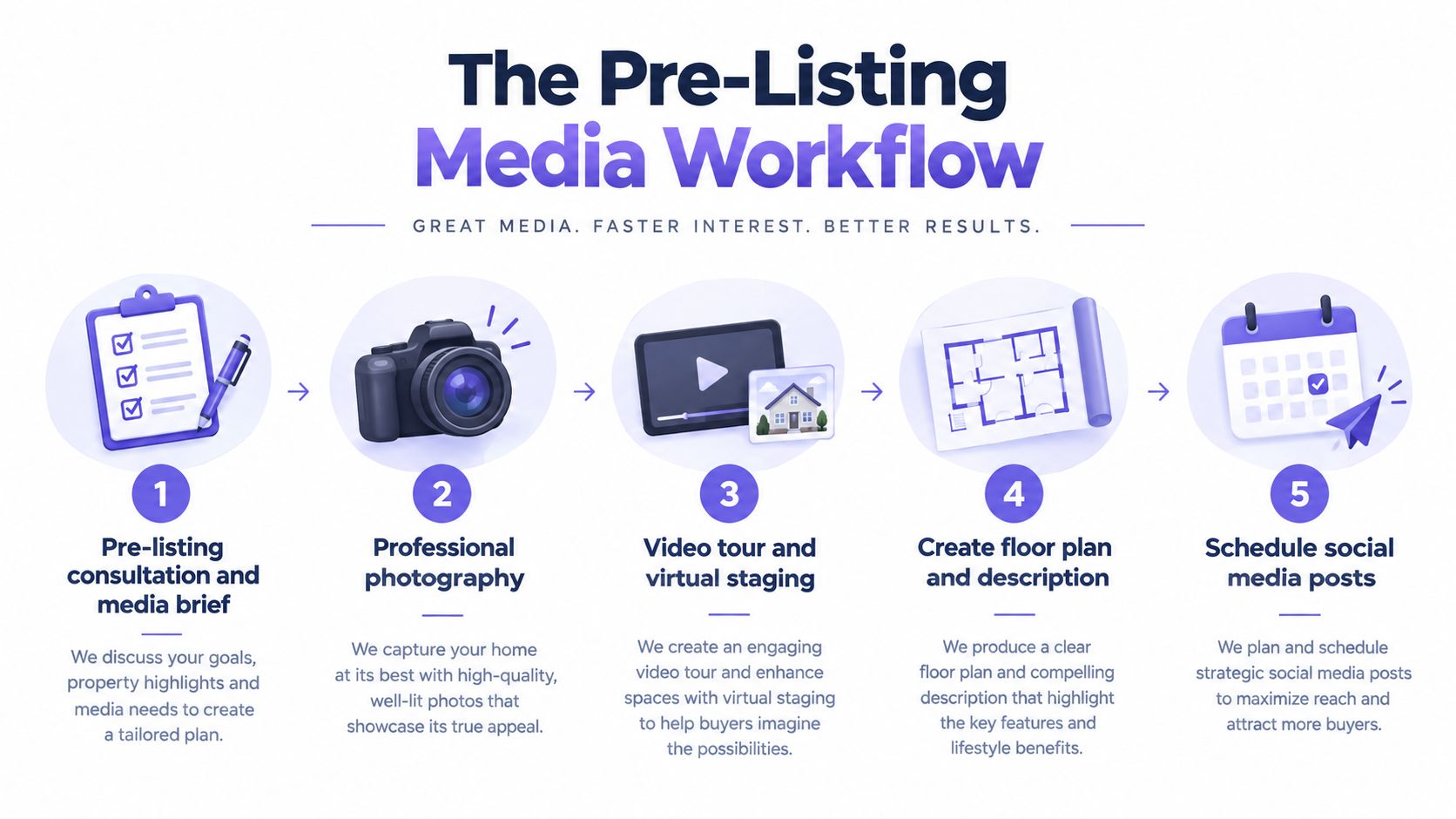
Use this production sequence to keep the launch consistent across every platform.
Using Virtual Staging to Lift Listing Performance
An empty room can be clean and attractive yet still leave buyers unsure how to use it. Virtual staging adds visual context to a vacant or dated space, but it should clarify the room rather than hide its condition.
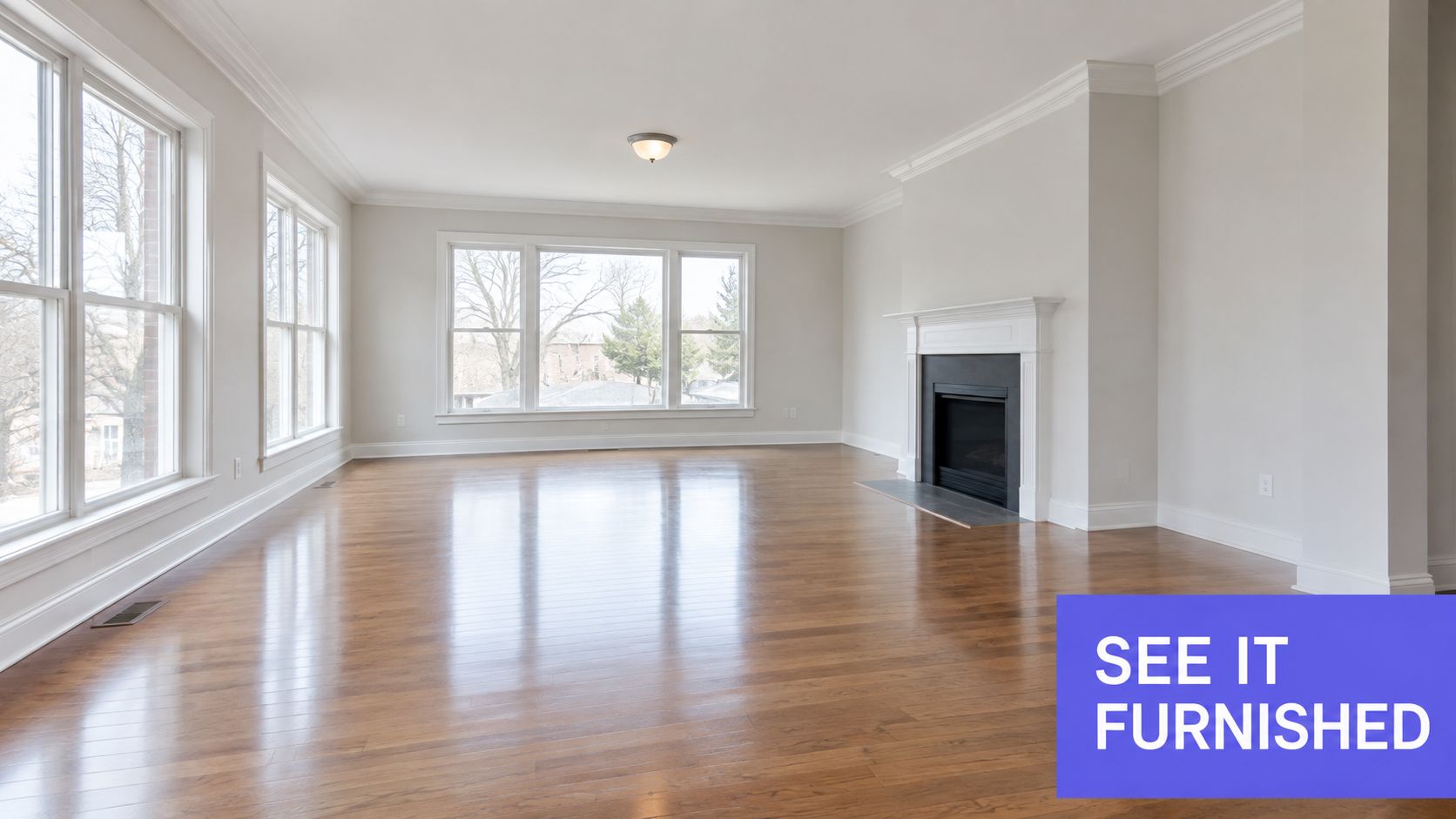
Consider a 1,400 square foot townhouse with an empty living room, neutral walls, hardwood floors, and a prominent fireplace. A bare photograph shows the finishes accurately, but the room's scale and purpose may be difficult to judge. A carefully staged version can show a sofa orientation, a conversation area, and the relationship between the fireplace and the circulation path. The result helps a remote buyer decide whether the room supports their lifestyle before booking a tour.
Decide when virtual staging fits
Physical staging makes sense when the seller can prepare the entire property and the home benefits from real furniture during showings. Virtual staging is useful when timing is tight, the seller lives elsewhere, the property is vacant, or only selected rooms need interpretation. Compare cost per room, turnaround time, buyer profile, and image purpose, not just the vendor quote.
Your render brief should be specific. Include:
- Room purpose: Explain whether the space is a living room, office, dining area, or flexible room.
- Reference style: Choose a coherent direction such as modern, traditional, or farmhouse.
- Target buyer: Describe the likely household without turning the image into a lifestyle advertisement.
- Lighting match: Ask the editor to preserve the original perspective, shadows, windows, flooring, and architectural details.
- Revision boundaries: Identify what can change and what must remain untouched.
Stage AI can be used as one workflow option for agents who need to declutter a listing photo, add furniture and decor, select a style preset, or provide plain-English staging instructions. Its listing-focused iOS app also supports HD exports for MLS, print, and social use. The agent still owns the quality check.
After approval, replace the selected MLS images, update the portal thumbnail if the hero frame changed, refresh social tiles, and update retargeting creative. Keep the original photo available so the marketing remains transparent and the buyer can distinguish the property from the editorial visualization.
Budget Allocation and KPIs That Matter
A marketing budget should reflect the listing's conversion problem, not a fixed percentage copied from another agent. A property with weak photography needs stronger media first. A well-presented listing with plenty of views but few showing requests may need better copy, clearer information, or faster follow-up.
Use budget tiers as planning frameworks rather than promises of a specific outcome. A starter package can concentrate on photography, essential video, light staging, and accurate distribution. A premium package can support expanded production, luxury print, portal visibility, social campaigns, drone work, and a more detailed follow-up operation.
| Tier | Total Budget | Photography and Video | Staging | Paid Social and Portal | Print and Signage |
|---|---|---|---|---|---|
| Starter | $2,500 | Core professional photography and practical video allocation | Selective virtual staging | Focused, testable placement | Essential sign and feature materials |
| Growth | $5,000 | Expanded photography and edited video | Several priority rooms | Paid social plus selected portal support | Coordinated print and signage |
| Premium | $10,000 | Full visual production, video, aerial, and specialty coverage | Broad staging and revision support | Larger campaign and portal mix | Elevated print, signage, and launch materials |
These dollar tiers are planning examples, not verified market averages. Set the final allocation after reviewing the property, seller goals, local competition, and expected buyer audience.
Track the path to a showing
Record the thumbnail click-through rate, inquiry-to-showing conversion, showing-to-offer conversion, days on market against a local benchmark, and price-reduction frequency. Add response time as an operational KPI, because marketing creates value only when someone handles the resulting interest.
Ignore raw impressions, follower growth, and total website visits when they aren't connected to property activity. Those numbers can rise while qualified inquiries remain flat. A small audience that books tours is more useful than a large audience that never reaches the listing page.
Review each listing weekly:
- Visibility: Thumbnail clicks and qualified listing-page visits.
- Engagement: Saves, shares, video completions, and floor-plan interactions where available.
- Demand: New inquiries and inquiry source.
- Speed: Median response time and unanswered inquiries.
- Conversion: Inquiry-to-showing and showing-to-offer movement.
- Market position: Days on market versus comparable local listings.
- Pricing signal: Feedback patterns and any price-reduction activity.
For a clearer vocabulary around measurement, use engagement metrics for real estate marketing. The purpose isn't to create a larger report. It's to identify the next action while there's still time to improve the campaign.
Your 90-Day Marketing Plan and Common Pitfalls
A 30-60-90 day rollout gives agents a practical way to build a listing-media system without waiting for a complete rebrand. The goal is simple: win the first screen with strong visuals, then protect the next five minutes with fast, property-specific follow-up.
Days 1 through 30
Audit the last 12 months of listings. Check hero images, gallery completeness, floor plans, video availability, inquiry sources, response records, and when each property received an offer. Use those findings to create a listing-media standard operating procedure, select approved vendors, prepare a seller checklist, and set up a virtual-staging workflow.
Reserve focused work time each week to document the process. The finished checklist should let another team member prepare and distribute a listing without asking what happens next. A repeatable system makes quality less dependent on one agent's memory.
Days 31 through 60
Apply the system to every new property. Run paid social and listing remarketing when the audience and property justify them. Build a dependable roster of photographers and videographers, and test alternative hero images when the platform permits it.
Connect every inquiry to a specific property and next action. Add evening and weekend coverage instead of assuming the listing agent will always be available. A buyer who receives a clear answer quickly is more likely to continue from online interest toward a showing.
Use a structured social media content strategy to repurpose approved listing media without producing disconnected posts.
Days 61 through 90
Review the seven KPIs from the previous section. Shift spend toward the zip codes, property types, creative formats, and channels that produce qualified showings. Train an ISA or response team to reply in under five minutes, then revise the SOP using what the team learns.
Common mistakes still weaken otherwise capable campaigns:
- Skipping twilight imagery: Distinctive exteriors lose impact when the best light is never captured.
- Listing before staging: An incomplete visual package weakens the first screen.
- Ignoring mobile load speed: Large, poorly prepared files frustrate buyers before they reach useful images.
- Writing generic copy: Use verified details, room relationships, and buyer-relevant benefits instead of unsupported adjectives.
- Delaying follow-up: A survey of more than 700 real estate professionals found that only 41% of real estate teams respond immediately to after-hours inquiries, leaving a meaningful operational gap.
Five practical questions
Which speed-to-lead tool should I use? Choose a CRM or lead-routing system that sends alerts, assigns coverage, records response time, and preserves property context.
Does virtual staging have a guaranteed return? No. Results depend on room choice, image quality, disclosure, price, and buyer fit. Use it to explain space, not promise a sale.
How much should I spend on photos? Start with professional photography as core listing infrastructure. Add video, aerials, or specialty images when the property benefits from them.
How often should I audit listings? Review active listings weekly, then conduct a broader media audit after enough campaigns reveal repeatable patterns.
When should I expect measurable lift? Track process and engagement changes after launch, while judging sales outcomes against local conditions and comparable listings.
A modern listing system wins attention before an agent ever speaks with a buyer. Stage AI helps real estate professionals declutter rooms, add photorealistic furniture and decor, and export listing-ready images for MLS, print, and social media from an iOS app. Use Stage AI to add visual context to the next listing, then connect that media to disciplined distribution and rapid follow-up. The image earns the click. The response process helps turn that click into a showing request.